2.6. Milling options
2.6.1. Menu operation
To change the value of the selected option, perform the following steps:
- The edit option is displayed on the screen; use the
NEXTbutton to move to the next one. - Press the
EDITbutton to enter the option you want to modify. - Use the
(>>)button to select a new parameter value. - Confirm your selection by pressing the
OKbutton, or cancel the change by pressing theBACKbutton.
The above procedure should be repeated for each option requiring modification.
2.6.2. Description of available options
SIZE - profile length
SHORT (30 mm)
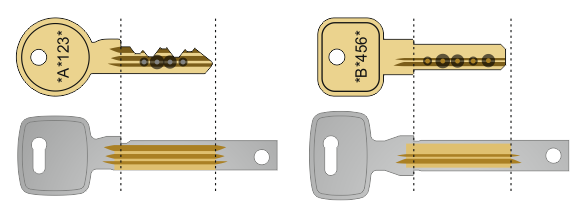
- Option for most keys.
LONG (33 mm)
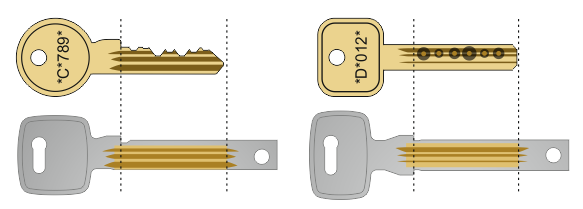
- Option for longer keys, usually cut with 7 notches.
Tip
If the longer option is insufficient, an additional 2 mm of profile length can be obtained by shortening the upper limit (base).
TYPE - type of key
The machine's firmware automatically recognizes the key type based on the profile data. This process takes place once before displaying the dimensions of the original key in the key profile loading procedures (scanning or receiving from a PC).
This option should be changed if the machine does not recognize the key type correctly or if a non-standard copy needs to be made.
CUT RAISED
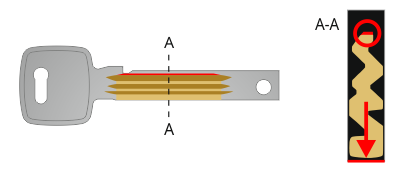
- The base of the milled profile is facing the base of the blank key (i.e. looking at the clamping in the machine to the left).
- The cuts at the base of the profile will be made like the rest of the profile (i.e., using universal/double-sided blanks, the upper left limit will be heavily undercut).
- In addition, the algorithm slightly extends the key profile at the top by 0.15 mm to compensate for possible wear on the original.
ORIGINAL CUT
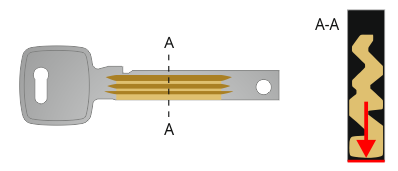
- The base of the milled profile is facing the base of the blank key (i.e. looking at the clamping in the machine to the left).
- The cuts at the base of the profile will be made like the rest of the profile (i.e., using universal/double-sided blanks, the upper left limit will be heavily undercut).
2-SIDED DRILLED
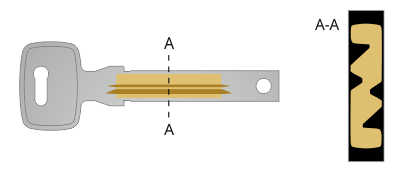
- The milled profile is centered to the width of the blank key (placed symmetrically).
CUTTING - cutting off excess material
This option facilitates subsequent processing of the blank key by making an additional cut to facilitate the removal of excess material. The effect depends on the type of key selected.
AUTOMATIC
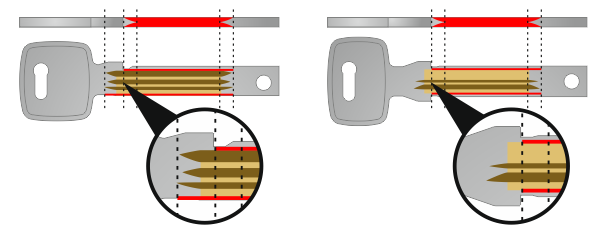
- The length of additional cuts is limited so as not to collect material from the upper limit (base), the limit value is calculated automatically based on the thickness of the blank key
OFF
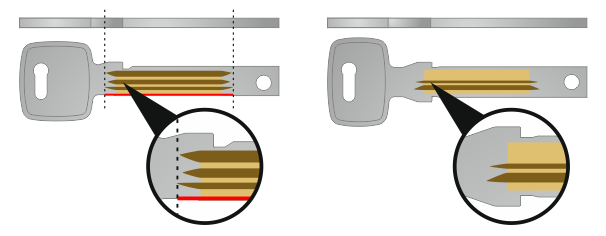
- No additional cuts.
FULL
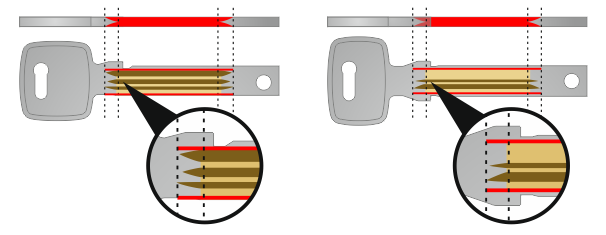
- The length of additional cuts is not limited; the upper limit (base) will be cut sharply.
Info
For cut keys, the bottom of the blank key is machined along its entire length. When using a universal blank key and selecting the cut type, the additional restriction will be heavily undercut to facilitate its removal.
BASE CUTTING
Additional milling process to reduce the thickness of the upper limit (base).
Info
This option is still under development.
Tip
In software version 2.0.x, there is a function that allows you to thin the base of single-sided keys. However, this should be treated as a test function and not as a fully functional one. To use it, you need to prepare a key profile with a base mapping in the X-KEY Neo program and load the profile data into the machine. Then, in the milling options on the machine, disable the option to cut off excess material.
MATERIAL - type of metal
The choice of material from which the blank key is made is important for the milling process, as each type of metal requires the use of appropriate machining parameters.
BRASS
- most commonly used
- easy to process
ALPAKA (new silver)
- harder than brass
- more difficult to machine, requires material to be collected in smaller layers
- selecting this option significantly increases the milling time
Warning
Using the brass option for alpaca/new silver will damage the cutter.
DEEPENING GROOVES
Function for improving the milled key profile, the following options are available:
ON
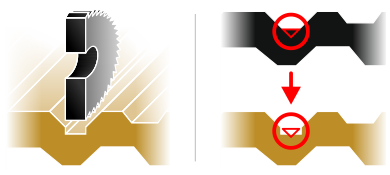
OFF
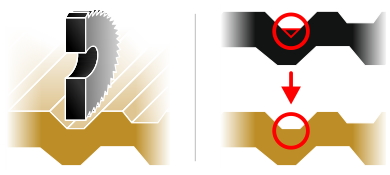
Description and explanation
If the original key profile was factory-made using a set of angle cutters cutting triangular grooves, it is not possible to perfectly scan and make a key profile using a tool that has a flat surface. The situation described is shown in the illustration below:
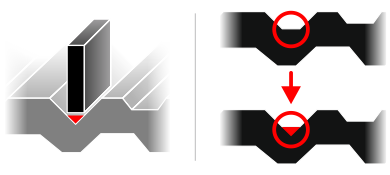
- gold/gray color - enlarged section of a key profile
- gray color – enlarged section of the original key profile
- black color – scanned key profile
- red color – area that cannot be scanned or milled using a flat-ended tool
The X-KEY Terminator machine scans the key with a measuring probe plate that is only 0.25 mm thick, while the cutter itself is 0.30 mm thick.
The solution to this problem is the groove deepening function, which analyzes the scanned key profile, looking for places where the measuring probe was unable to take a correct measurement, and deepens these places during the key profile making process. This allows you to make a copy of the key profile that will fit even the most accurate locks.
Please note that the groove deepening function reduces the thickness of the profile within its operating range, thereby weakening the milled key mechanically.