1.5. Milling unit
1.5.1. Description of components
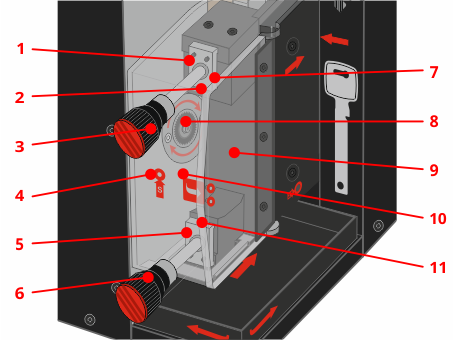
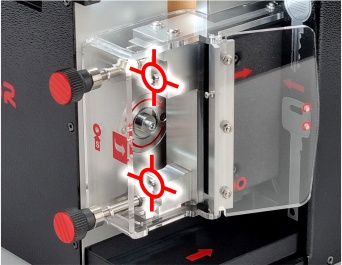
- Upper clamp pressing the blank key
- Key presence sensor in the slot (covered by the upper clamp)
- Upper clamp knob
- Service opening for the locking pin of the electric spindle when replacing the cutter
- Lower clamp pressing the blank key
- Lower clamp knob
- Element for fixing the upper part of the blank key in the socket (covered by the upper clamp)
- Milling cutter with mounting elements
- Milling slot cover door
- Milling slot cover
- Element for fixing the position of the lower part of the blank key in the socket (covered by the lower clamp)
1.5.2. Process of fixing the blank key in the milling unit
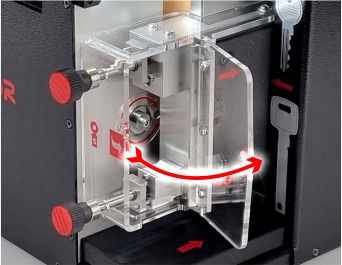
1.
Open the milling slot cover by pulling it back by the protruding edge indicated by the red arrow.
If necessary, clean the inside of the milling slot with a brush to remove any metal filings left over from the previous machining process.
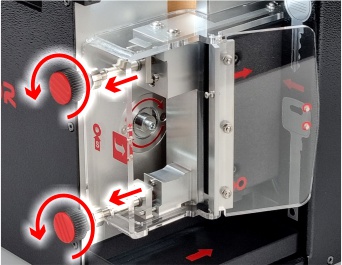
2.
Loosen the clamps pressing down on the top and bottom of the blank key by turning the knobs so that there is enough space to insert the blank between the clamps and the key positioning elements.
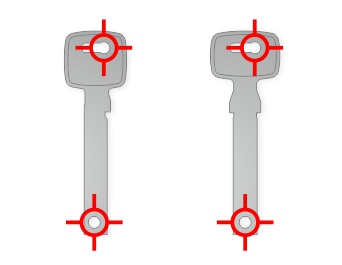
3.
The position of the blank key in the milling slot is indicated by an information sticker on the machine housing. Pay attention to the position of the round locating holes at the top and bottom of the blank.
For single-sided key blanks, the upper stop (the so-called base) should be facing right – towards the door of the cutter slot cover.
4.
Insert the blank key into the milling slot and slide the holes at the top and bottom of the blank key onto the blank key positioning elements. When doing this, be careful not to catch the key presence sensor; it may only be pressed by a correctly positioned blank key.
5.
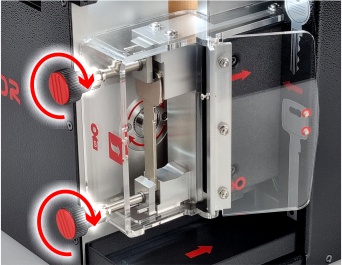
Secure the blank key in the milling slot by tightening the clamping knobs with sufficient force to ensure stable profile milling.
Do not use excessive force to avoid damaging the fasteners. Too little force causes noise, vibration, and milling errors – in this case, brake and start again using the correct force.
Warning
The blank key may only be placed in the milling unit when the machine displays a message indicating that this is necessary; otherwise, this is prohibited! It is not permitted to leave the blank key in the milling slot after processing is complete, as this may damage the milling cutter and other machine parts.
1.5.3. Clamping of blank keys thicker than 3 mm
Depending on the version of the X-KEY Terminator machine, the method of attaching thick blank keys may vary. Older models required the use of special attachments (spacers), while in newer machines their use is no longer necessary.
The illustration shows a comparison of the older (1) and newer (2) versions of the machine.
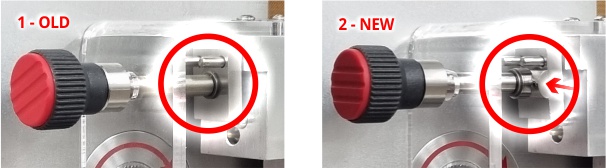
The change results from the modification of the milling socket clamping elements, which now allow thick blank keys to be clamped correctly without the use of attachments.
1.5.4. Information about the cutter
The dedicated X-KEY cutter allows you to make approximately 100 key profiles. This number depends on the thickness of the blank keys, the material they are made of, and the shape of the profile, which determines the amount of material removed during machining.
Information about the condition of the cutter and the number of profiles made since the last cutter replacement is displayed each time you enter the key profile mode.
Tip
When the calculated service life of the cutter has been reached, a message will be displayed indicating that it needs to be replaced. It is recommended to replace the cutter with a new one and calibrate the milling machine immediately to maintain the proper quality of the key profiles.
Warning
If unusual noises or vibrations occur during the machining of blanks, this may indicate that the cutter has reached the end of its service life. In this case, it is recommended to replace the cutter with a new one.
Danger
If any damage to the cutter is found (e.g., chips, cracks, broken teeth), it must be replaced immediately. Continuing to work with a damaged cutter may result in damage to the machine!
1.5.5. Only for older machines - the process of mounting attachments for thick blank keys
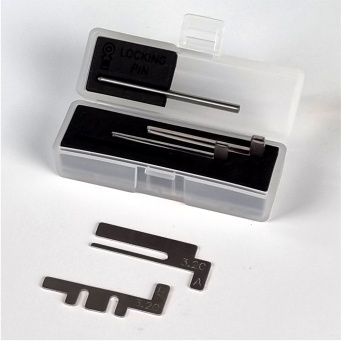
The process of clamping raw materials thicker than 3 mm for older machine versions is similar to the standard clamping of thinner raw materials. However, in this case, it is absolutely necessary to use attachments for thick key blanks before inserting the raw material for processing.
- The attachments are available in three versions for use with the following blank key thicknesses:
- 3.2 mm
- 3.6 mm
- 4.3 mm
- Each attachment is engraved with a thickness marking and a letter indicating which clamp it should be mounted on:
- A - upper clamp
- B - lower clamp
Warning
Failure to follow the instructions will result in permanent damage to the guide rails that hold the blank key in place.
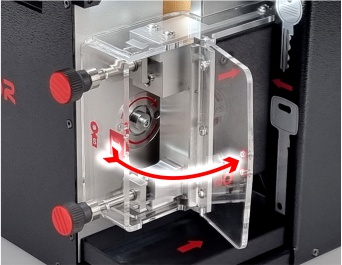
1.
Open the milling slot cover by pulling it back by the protruding edge indicated by the red arrow.
If necessary, clean the inside of the milling slot with a brush to remove any metal filings left over from the previous machining process.
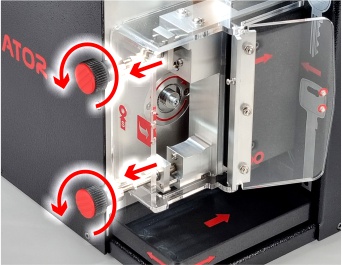
2.
Loosen the clamps pressing the lower and upper blank keys by turning their knobs so that there is enough space to insert washers between the clamps and the surface of the milling seat where the clamps rest.
Due to the shape of the lower shim, the lower clamp should be retracted until the guide pins are flush with the surface of the clamp.
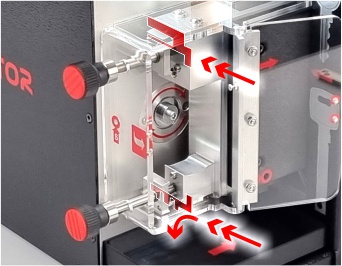
3.
Insert the appropriate attachments in the correct position depending on the thickness of the blank key.
Only after the attachments have been correctly positioned can the blank key be clamped.
Info
After finishing work with thick blank keys, remove the shims from the milling slot and store them in the box for basic tools.
Warning
Working with standard blank keys (i.e., with a thickness not exceeding 3 mm) and washers for thick blank keys will cause permanent damage to the guide rails that hold the blank key in place.